

Sep 17 •
Notebook to connect with lakehouse dynamically
Current my notebook is connected with default lakehouse and I am able to do all operations. But I have a use case where I need my notebook to connect with any lakehouse dynamically using some configuration. Is this possible? How can I get it done?

3d •
D𝐲𝐧𝐚𝐦𝐢𝐜𝐚𝐥𝐥𝐲 𝐬𝐞𝐭 𝐲𝐨𝐮𝐫 𝐝𝐞𝐟𝐚𝐮𝐥𝐭 𝐥𝐚𝐤𝐞𝐡𝐨𝐮𝐬𝐞 for Notebooks
Hey Microsoft Fabric folks, now you can 𝐝𝐲𝐧𝐚𝐦𝐢𝐜𝐚𝐥𝐥𝐲 𝐬𝐞𝐭 𝐲𝐨𝐮𝐫 𝐝𝐞𝐟𝐚𝐮𝐥𝐭 𝐥𝐚𝐤𝐞𝐡𝐨𝐮𝐬𝐞 in Microsoft Fabric notebooks—it's now generally available and makes managing environments easy! This can be done even across workspaces using variable library values, so no more manual UI Lakehouse attachment needed, when switching dev/test/prod. Here's how to set it up - super easy: • First, create a 𝐕𝐚𝐫𝐢𝐚𝐛𝐥𝐞 𝐋𝐢𝐛𝐫𝐚𝐫𝐲 in your workspace (e.g., name it "myVL"). • Add string variables like: - LHname → your lakehouse name - LHid → lakehouse ID (needed only for cross-workspace) - WorkspaceId → target workspace ID (needed only for cross-workspace) • In your notebook, make the 𝐯𝐞𝐫𝐲 𝐟𝐢𝐫𝐬𝐭 𝐜𝐞𝐥𝐥 a 𝐏𝐲𝐒𝐩𝐚𝐫𝐤 cell and add this code: %%configure { "defaultLakehouse": { "name": { "variableName": "$(/**/myVL/LHname)" }, "id": { "variableName": "$(/**/myVL/LHid)" }, "workspaceId": { "variableName": "$(/**/myVL/WorkspaceId)" } } } • Run the cell (it may ask to restart the session—just say yes). That's all! Your notebook now automatically uses the lakehouse from your variables. Drop the id/workspaceId parts if it's in the same workspace. Perfect for reusable notebooks and automated pipelines. Who's already using this? Drop your thoughts below! https://l1nk.dev/wHVON Full details: https://lnkd.in/gShwbfwH #MicrosoftFabric #DataEngineering #Lakehouse #Notebooks #VariableLibrary
2
0

May '24 •
Extend Fabric Trial?
Hi everyone! Does anyone know how to submit a request to extend the trial period for Microsoft Fabric? Thanks in advance!

🚀
12d •
🔥 Fabric QUICKFIRE Q&A Thread 🧵 [15th December 2025]
Post your burning question about Microsoft Fabric in this thread below 👇 will try to answer as many as we can!
![🔥 Fabric QUICKFIRE Q&A Thread 🧵 [15th December 2025]](https://media1.giphy.com/media/v1.Y2lkPTQ3ZDA4Y2UwN3c2eHZ6YTdvZWcwMGkxZHgybjB1OThjYmpoNHU1OGo4dTBzdWpoNyZlcD12MV9naWZzX3NlYXJjaCZjdD1n/Rs2QPsshsFI9zeT4Kn/100.gif)

5d •
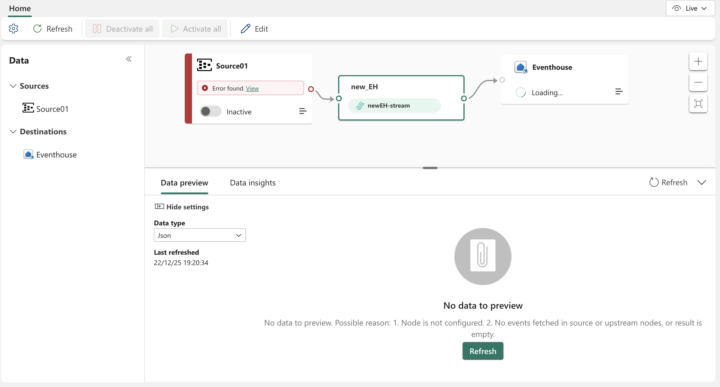
#Eventstream
Hi @Will Needham & community I created an Azure Event Hub connection and shared it with users in my organization. They can successfully connect to the Event Hub while creating an Eventstream, and they can also see data in the preview. However, when they publish the Eventstream (with or without an Eventhouse destination), they encounter the following errors: Source error: Message: Failed to update data source: Source01.Details: Long running operation failed with status 'Failed'. Additional Info: 'A task was canceled.' Destination(Eventhouse) error: Message: Failed to create data source: Eventhouse due to the following error: Long running operation failed with status 'Failed'.Details: Long running operation failed with status 'Failed'. Additional Info: 'A task was canceled.' Has anyone faced this issue while connecting Azure Event Hub with Fabric Eventstream? Please share your insights or possible fixes.
0
0
1-30 of 1,491

skool.com/microsoft-fabric
Helping passionate analysts, data engineers, data scientists (& more) to advance their careers on the Microsoft Fabric platform.
Leaderboard (30-day)
1

+21
2

+20
3

+12
4

+11
5

+10
Powered by