
Write something
Pinned

Sep '25 •
Introduce Yourself (Start Here 🔥)
Hi 👋 Welcome to the Gravity Ranger base station! This community helps Gravity Forms users grow their skills with tutorials, classes, resources, and discussions to increase their success through sales, conversions, and overall business growth. Step 1: Introduce yourself in the General Discussion tab! (✂️ copy/paste template 👇🏼) Where are you from? What are you working on? What immediate help do you need?
0
0
25d •
Using Blocks When Publishing Through WordPress
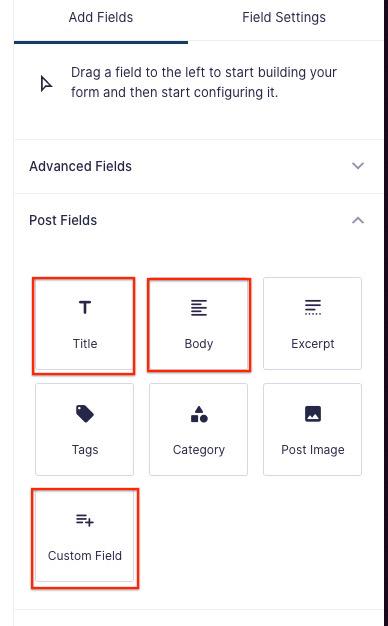
If you use the block editor and use Gravity Forms to publish a post, it does not use the heading or paragraph blocks to publish the content, it dumps the content in a classic block. I had someone ask me this question yesterday: > Hi, when creating a post in WordPress, one can insert a table into the post by choosing the "table block". Can Gravity Forms allow a user to submit a WP table through a frontend form? Thank you for any help. The short answer is, Yes. The long answer is it require custom code. Not a lot and nothing too tricky but I was able to come up with a simple solution for this specific use case that creates a table with the submitted content. You can grab the code snippet here: https://gist.github.com/chrisegg/e83999289f641fcf400d9e3a0a36c9ea How to Use: 1. Update the form ID check to match your target form. 2. Replace the merge tags ({Name:1}, {Email:2}, etc.) with your own field labels and IDs. 3. Add this snippet to a plugin, MU-plugin, or your theme’s functions.php file. 4. Ensure the Gravity Forms Post Fields are configured to create a post. This is a simple solution that addresses a single use case, so let me know if you need help expanding upon this to fit your solution. Be sure that you are using the Post Fields shown in the screenshot. In this specific example I am using the Custom Fields type for the Email, Name, Company fields. I've also included the form template file so you can import it and see the setup. Enjoy! Chris
0
0
Oct '25 •
Masterclass 10.10.25 Discussion Board
Hope you enjoyed this months training on Membership sites! Use this post to discuss the class and ask your questions and provide any feedback
Sep '25 •
New Plugin Demo: Show a Popup Message Based on User Input in Gravity Forms
Ever wanted to display a popup message before a form is submitted, based on what the user selects? I just built a lightweight plugin that does exactly that for Gravity Forms — and it’s super flexible. 🔥 Use Case That Sparked the Idea Someone asked if it was possible to show a popup when a user enters a zip code outside a service area — just to notify them before they submit the form. That kicked off this mini plugin: it uses HTML fields in Gravity Forms and turns them into modals, triggered via conditional logic. 🧪 How It Works - You create an HTML field like usual in your Gravity Form. - You set conditional logic to show the field when certain selections are made (e.g. wrong zip code, out-of-stock item, high quantity). - You check a new setting I’ve added: “Display as Modal when Visible.” - When the condition is met, instead of appearing on the page, the field content is displayed as a popup modal. 🙌 That’s it. No extra JS or third-party popup tools needed. 🧠 What You Can Use It For - 🚫 Zip codes outside your service area - 🔒 Product variations that are out of stock - ⚠️ Quantity warnings (e.g. “Max allowed is 10”) - 💡 Educational reminders or disclaimers - ❗️Flags for non-ideal selections without blocking form submission You can even choose whether to hide the submit button based on the selection (with native conditional logic). Or just let them submit anyway — totally up to you. 🔁 You Can Add Multiple Popups The plugin supports multiple HTML fields set to display as popups — so you can use it in multiple spots in a single form. 📺 Watch the full demo here if you want to see how it behaves with dropdowns, checkboxes, and number fields. Let me know in the comments if you’d use this or have ideas for other triggers — it’s still experimental, but I’d love your feedback before I decide what to do with it.

Oct '25 •
New Quick Tip: Styling Field Groups Without an Add-On
In this short video, I walk through a simple way to style groups of fields in your Gravity Forms without using an add-on. If you saw my earlier post about Collapsible Sections, this builds on that idea, but this time we’re doing it all with just HTML fields, CSS, and a small bit of jQuery. You’ll see exactly how to wrap your field groups and give them clean, distinct styling that makes your forms look more professional and organized. I’ll also be sharing the code and setup docs right inside this discussion once they’re ready 👇 Watch the video to see how it works, and be sure to let me know in the comments if you want me to notify you when the code is available.

1-23 of 23

Powered by