
Write something
Pinned

Jan '24 •
👉🏼Start Here — Directions for new members
Welcome to businessXP! GROUP INSTRUCTIONS ✅ Be helpful and kind. ✅ Invite your friends to join us. ✅ Share ideas and resources related to learning about BUSINESS & MONEY & GAME DESIGN. ❌ No sales pitches — Zero tolerance. ❌ No profanity. No politics. No drama. CLASSROOM TAB 💡Access free guides and resources under the Classroom tab. Unlock more as you engage with the community. 💡If you're here to learn about business, start with the free 1-HOUR ENTREPRENEUR Video Training. DISCUSSION CATEGORIES 🔵 Business & Money — Post your business and personal finance questions, ideas, and resources. Do you have questions about startups or inventing or scaling a business? Post them in this category. 🔵 Game Design — Post your game design questions, ideas, and resources. 🔵 businessXP & GoVenture Games — Post your gameplay questions, suggestions, and bug reports. 🔵 Classroom Comments — These posts are for members who review the resources under the CLASSROOM tab. YOUR REWARDS - Access free resources right now under the Classroom tab. - Earn points to unlock more rewards under the Classroom tab. - Points are earned by liking posts, comments, and replies. 1 like = 1 point for the author. Click the LEADERBOARD tab to see how you rank. EMAIL NOTIFICATIONS - You will receive email notifications when people engage with your posts or comments. - To change the email settings, click your personal graphic in the top right corner then Settings > Notifications. PHONE APP Use these links or search the app store for Skool.com - iPhone - Android ABOUT US AND THIS GROUP Click the ABOUT tab for details.

27d •
I ran an experiment
Could I teach people the fundamentals of entrepreneurship ... For free? In just 1 hour? Using recorded video? And make it effective and enjoyable? After 1,890 students enrolled and a 4.8⭐rating, I think it's a yes. The secret sauce? I play a business simulation. Best of all — you can try it yourself right here in our businessXP community — click the CLASSROOM tab
0
0

Jul 1 •
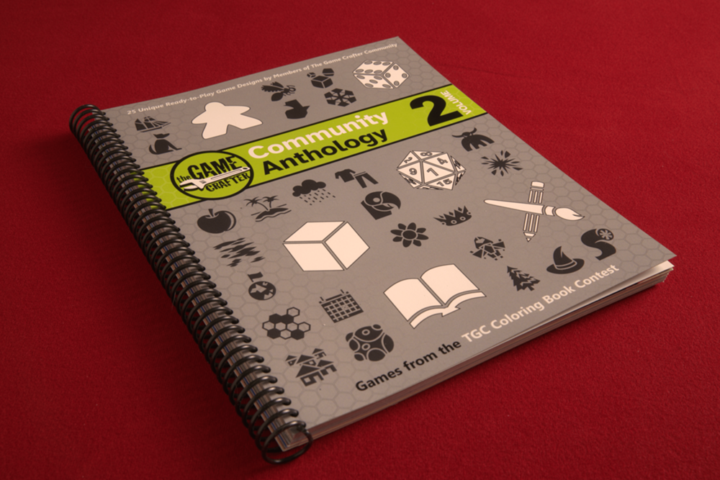
Free Book of 25 Print, Color, & Play Games
Designed by members of The Game Crafter’s vibrant community. This anthology contains 25 games where the goal is not to just play the games but have fun coloring them as well. Each game takes up only two pages, which lay flat for easy play. Attached is the free PDF. Note that the cover page seems to be incorrectly labelled. The printed book can be purchased at The Game Crafter: https://www.thegamecrafter.com/games/tgc-community-anthology-coloring-book PS: I frequently use The Game Crafter to manufacture prototypes of my board games and card games. I can order 1 or 2 games and all related parts to test out.
0
0

May 12 •
Introduction
Hey everyone! 👋 I'm Tara Coleman, a new business owner excited to be here! I'm looking to connect with other business owners, learn from your experiences, and work toward my business goals. Happy to be part of this community, let's grow together!
May 25 •
Every game is educational.
Even the ones designed purely for entertainment. Whether we’re flinging angry birds, trading with aliens, or leading a guild into battle, our brains are learning. We’re learning the rules of the game, how to interact with it, the choices we can make, the consequences of those choices, and much more. So the real question isn’t whether a game teaches — we know it does — the question is what does it teach and how useful is that learning in real life. That’s why games and simulations designed specifically for education can be so powerful. When designed well, they facilitate thinking and skill building that is directly transferable to real-world success. This is not gamification — this is experiential game-based learning.
2
0
1-30 of 110

skool.com/bxp
Quickly gain the skills of an entrepreneur and confidence of a business leader — by playing realistic simulations and games (or design your own).
Powered by