
Write something
Pinned

4d •
Premium Members: How to Install the Skills Marketplace (One-Time Setup)
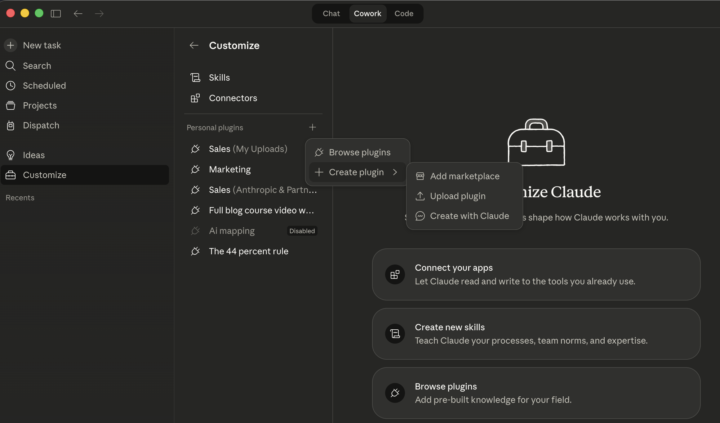
As a Premium member, you get one-click access to every skill and plugin we release — current and future. Here's how to set it up (takes 60 seconds, you only do this once). SETUP IN CLAUDE COWORK (Desktop App): 1. Open Claude Cowork 2. 2. Click the hamburger menu (top left) 3. 3. Click "Customize" 4. 4. Under "Personal plugins", click the + button that says "Add plugin" 5. 5. You'll see options for Local uploads, Marketplaces, etc. 6. 6. Click the + next to add a marketplace 7. 7. When it asks for the source, paste this exactly: beginnersinai/claude-skills-marketplace 1. Hit enter. The marketplace appears with all available skills. 2. 9. Click the + next to any skill to install it. SETUP IN CLAUDE CODE (Terminal): Type this command: /plugin marketplace add beginnersinai/claude-skills-marketplace Then install any plugin: /plugin install ai-mapping WHAT THIS GIVES YOU: - Every skill and plugin we release, instantly available - - No downloading ZIP files or manual installs - - New plugins show up automatically when we publish them - - Just refresh Claude to get the latest CURRENTLY AVAILABLE: - AI Mapping Plugin — scans your business across 10 functions, finds where AI should be but isn't More skills coming regularly. You'll get an announcement post here every time a new one drops. Questions? Drop a comment below.
2
0
Pinned
4d •
Welcome — Start Here
Welcome to Beginners in AI! This is where you get free Claude skills and plugins, learn how to use them, and connect with other people building with AI. What you get for free: - Download Claude skills & plugins that work across Claude Code, Cowork, and the browser - - Community access — ask questions, share wins, request new plugins - - Access to our beginner AI course in the Classroom What Premium members get ($29/month): - All video courses (Claude from zero to power user) - - Live build sessions where I create new plugins in real-time - - Early access to new plugins before they hit the website - - Priority support and custom plugin requests Get your first skill now: AI Mapping Plugin — finds where AI should be in your business but isn't Download: beginnersinai.org/get-ai-mapping-plugin/ GitHub: github.com/beginnersinai/ai-mapping-plugin Browse all skills: beginnersinai.org/skills Subscribe to the newsletter: beginnersinai.com/subscribe Drop a comment below and tell us what you're working on!
2
0
4d •
AI Mapping Plugin — Free Download + Quick Start Guide
Your first free Claude skill is here. This plugin scans your business across 10 functions and shows you where AI should be but isn't. Based on a Harvard/INSEAD study of 515 startups. HOW TO INSTALL (30 seconds): 1. Download the ZIP: github.com/beginnersinai/ai-mapping-plugin (click Code > Download ZIP) 2. 2. Open Claude Cowork (or Claude Code) 3. 3. Go to Customize > click the + next to "Personal plugins" 4. 4. Drag the ZIP file in 5. 5. Done. No configuration needed. WHAT YOU GET (4 tools): /map — Full business audit. Asks you 5 questions about your business, scans your workspace, maps AI usage across 10 functions, identifies gaps, generates a report. Start here. /map-score — Run this AFTER /map. Scores and ranks every opportunity by revenue impact, capital savings, and ease of implementation. Tells you exactly what to do first. /map-venture [name] — Deep dive on one specific project. Same 10-function analysis but focused on a single business or venture. Auto-activating skill — No command needed. Whenever you discuss AI strategy in any conversation, Claude automatically loads the framework and examples. Just start talking about where to use AI and it kicks in. RECOMMENDED FIRST STEPS: 1. Type /map and answer the 5 questions 2. 2. Review your AI Map report 3. 3. Type /map-score to get your ranked action plan 4. 4. Start with the top opportunity — especially anything flagged "Press Send" 5. 5. Re-run /map monthly to track progress THE RESEARCH: Based on "Mapping AI into Production" (Kim, Kim & Koning, 2026) — 515 startups, Harvard & INSEAD. Firms shown how others reorganize around AI found 44% more use cases and generated 1.9x higher revenue. Full breakdown: beginnersinai.org/mapping-ai-research-study/ Download: beginnersinai.org/get-ai-mapping-plugin/ Full article: beginnersinai.org/ai-mapping-plugin/
1
0
Sep '25 •
MinMax Website Builder
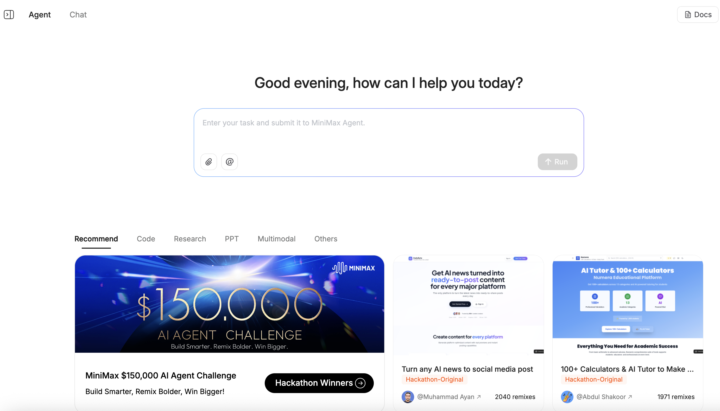
I've tried all of the AI coding tools for website building and none of them are as good as MinMax. You can take what you've learned here about prompting to use your current tools to create a really sophisticated prompt that you feed into the AI. Everything is in plain spoken English and it can design everything from the front end that your viewers interact with to the back end database. It's still not perfect and you can't design anything overly complicated, but it is very good at prototyping functional website ideas in under five minutes. I highly recommend trying this out.
Jun '24 •
Start Here
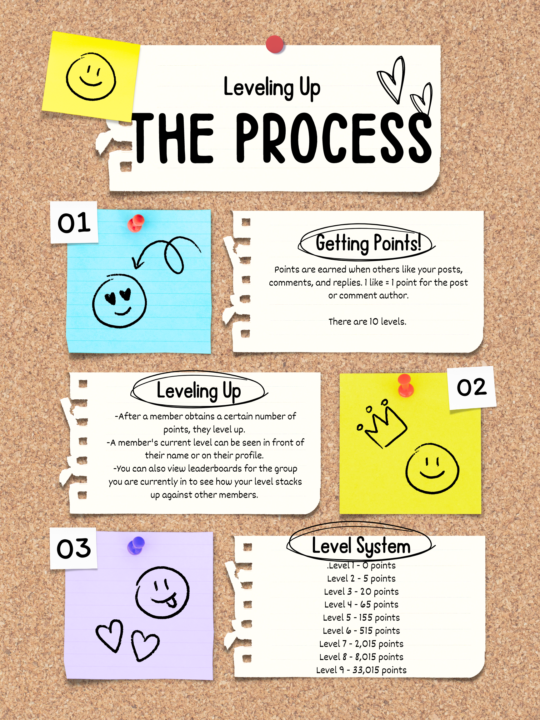
Feel free to introduce yourself on this thread or go straight to "Classroom" to access your course(s). Updates, News, Opinions, and Questions can all be put into the community post based on category. Leveling Up: Skool's leveling up point process is posted below. You don't need to participate to enjoy the courses. These are for those who want to enter the contests and win prizes each month once we hit 50 members. To speak to other members, use the @ symbol everyone on the chat.
1-30 of 240

skool.com/beginnersinai
Free Claude skills & plugins for your business. Video courses, community support, and live builds. 1,200+ free guides at beginnersinai.org
Powered by