

💎
⭐
Oct '24 •
Welcome! Introduce yourself + share a career goal you have 🎉
Let's get to know each other! Comment below sharing where you are in the world, a career goal you have, and something you like to do for fun. 😊
4h •
Im gonna document the journey
Ima 18-year-old guy in the AI niche. Built a SaaS to solve my own problem regarding cold emails. I got some eyeballs on it, got some appreciation and some "congrats", and $0 rev. Built an app to solve my own problem of inconsistency and un-disciplined life. Gonna launch it soon. Now the hardest part: marketing. With a pretty small amount in my bank account, I'm focusing on organic (IG) only. I will document my journey. My bottlenecks. My achievements. Some common shits that a young dude (if one's dad isn't that rich) may face while following his/her passion. If u're interested, just keep ur eyes open (there's no need to "follow for more" here)!

3h •
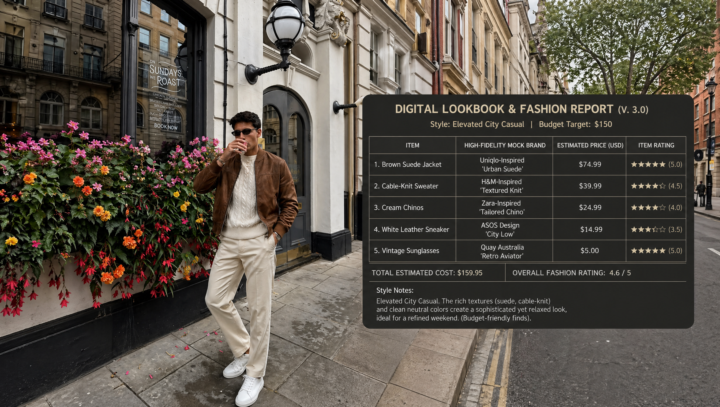
🧠 AI Fashion Intelligence
What if your AI knew your style better than you did? 🧐 The AI analyzes your build and the background to pick a 'best-fit' outfit, then generates a detailed 16:9 report featuring brands, ratings, and prices that won't break the bank It’s basically a personal stylist in a box—check out the level of detail on this one!
5h •
Skills for Claude code
Yo guys i Need some help. Im tryna build website and mini web apps using Claude code, the problem Is the design. What skills should i install tò make these products feel premium? I also want tò build Digital products using Claude code but the design of them are Just not Gold enough, PLS help me out and tell which skills i should install, because in also watching lot of YT videos but dont know what tò install

2h •
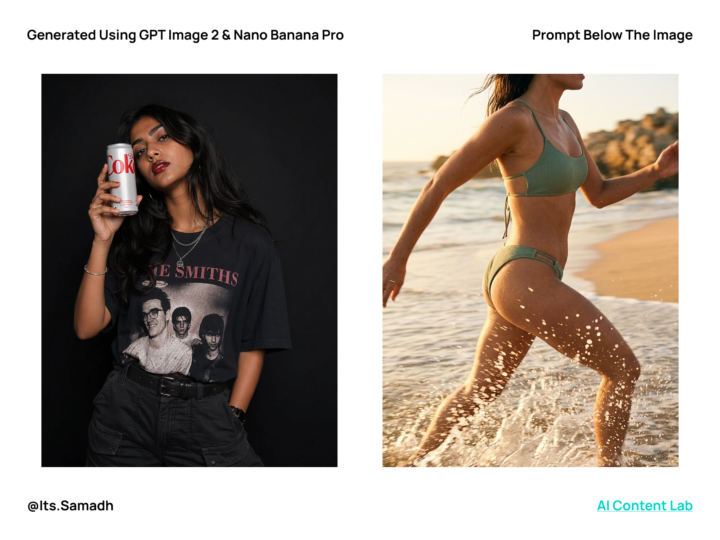
The Real Reason Your AI Portraits Look Fake (No One Talks About This)
Most bad AI portraits don’t come from the model. They come from vague prompts. After generating a lot of images using newer tools like Image GPT-2 and Google Nano Banana Pro, one thing became very clear, the difference between an average image and a really good one is usually just how you describe it. There’s actually some data around this too. In a lot of prompt testing communities, people have seen that just making prompts more specific can improve results by almost 40–50%, without changing any settings. 1. Start with real detail Instead of writing something like “beautiful woman smiling,” try describing what you actually want to see. “slight smile, eyes looking at the camera” That one small change already gives the model direction. Then layer in realism: - natural skin texture - visible pores - small imperfections This is what removes that overly smooth, plastic look. 2. Control the lighting (this matters more than you think) Lighting alone can completely change the result. Pick one clear style: - soft diffused lighting → clean, natural - window light from the side → adds depth - dramatic side lighting → more cinematic Mixing multiple lighting styles usually confuses the model, and that’s when things start looking off. 3. Push it toward photography AI tends to lean a bit “illustration-like” unless you guide it. Adding small cues helps a lot: - photorealistic - shallow depth of field - film grain - DSLR / mirrorless camera People have noticed that adding camera-related terms can make outputs feel way more consistent and real. 4. Use negative prompts This is something most people skip. But telling the model what you don’t want helps clean up a lot of issues: - deformed eyes or pupils - cartoon / anime / CGI look - duplicate faces - weird distortions Even simple negative prompts can reduce visible errors quite a bit. 5. Be specific with textures This is where realism actually comes from. Instead of generic words: - Skin → pores, fine texture, slight variation
1-30 of 9,704

skool.com/ai-automation-society
Learn to get paid for AI solutions, regardless of your background.
Leaderboard (30-day)
1
+5444
2

🔥
+4084
3

+3503
4

+2244
5
+992
Powered by